Best Gaming Laptops, Reviewed by Experts (2026 Picks

Shopping for a gaming laptop right now is a headache. Brands throw around “AI-powered performance,” “Blackwell architecture,” and “next-gen cooling” until it’s hard to tell what’s real and what’s just copy written by marketing. The GPU tiers alone will make your head spin — RTX 5050, 5060, 5070, 5080, 5090 — and two laptops with the identical GPU name can perform wildly differently once you account for power limits and cooling design.

That’s the gap this guide fills. Every pick below comes from hands-on testing: real FPS benchmarks, thermal checks, battery drain tests. No sponsored placements, no repackaged spec sheets. You’ll get a comparison table, full reviews organized by use case, a buying guide in plain English, and answers to the questions people actually search for.

How We Test and Rank Gaming Laptops

A “best” gaming laptop isn’t whichever one has the biggest GPU printed on the box. We run the same suite of games — a mix of esports titles and demanding AAA games — across multiple resolutions and log real average and 1% low frame rates, not the numbers on a marketing slide.

We also run extended thermal tests, tracking CPU and GPU temps under sustained load. Specs alone won’t tell you a laptop throttles after ten minutes; a stress test will. Battery testing covers both everyday use and actual gaming sessions, timed and measured. And we physically handle every unit — hinges, keyboard flex, port layout, display quality, the works.

Performance and cooling carry the most weight in our rankings, since a hot, throttled laptop undercuts everything else about it. Value, portability, and display quality come next. That’s the bar every laptop on this list had to clear.

Quick Comparison Table — Best Gaming Laptops at a Glance

LaptopPrice (Starting)GPUBest ForRating
HP OMEN MAX 16~$2,199RTX 5080/5090 (up to 175W)Best Overall4.7/5
MSI Katana 15 HX~$1,199–$1,499RTX 5050/5060Best Budget4.2/5
Razer Blade 16 (2026)~$2,399RTX 5060–5070Best for Esports4.4/5
Lenovo Legion Pro 7i~$2,599RTX 5080/5090Best for AAA/High-End4.5/5
Razer Blade 14 (2025)~$2,299–$2,699RTX 5060/5070Best Ultraportable4.5/5
MSI Vector A16~$1,499RTX 5070Best Value for Money4.3/5

Expert Picks — Best Gaming Laptops Reviewed

Best Overall — HP OMEN MAX 16

The OMEN MAX 16 takes the top spot because it doesn’t make you choose between power and usability. Configure it with a fast Intel HX-series chip and an RTX 5090 running at up to 175W, and you get a GPU that’s actually allowed to work instead of being artificially capped. In testing, that shows up as smooth, consistent frame rates in demanding AAA titles at high settings — none of the stuttering you get from underpowered chassis trying to punch above their weight. The 16-inch display and cooling system are built for long sessions, not just a good first ten minutes.

Pros: excellent sustained performance, flexible configs, strong value against rivals with similar GPUs. Cons: the design looks dated next to sleeker competitors, and it’s heavy to carry around.

Best Budget Gaming Laptop — MSI Katana 15 HX

Want solid 1080p gaming without dropping two grand? Look at the Katana 15 HX. Entry builds pair an RTX 5050 or 5060 with a 16-core Intel Core i7-14650HX, and I’ve seen pricing dip to $1,100–$1,200 during sales, with standard pricing sitting around $1,199–$1,499 depending on RAM and GPU. The 165Hz QHD panel is the real standout here — sharper than the 1080p screens you usually get at this price.

The catch is a plainer chassis and a display that washes out a bit in bright rooms. Still, if you want solid frame rates in most AAA titles at high settings and don’t care about flashy design, this is one of the better deals out there right now.

Best for Competitive/Esports Gaming — Razer Blade 16 (2026)

Competitive players care about two things: refresh rate and consistency. The 2026 Blade 16 delivers both, pairing RTX 50-series graphics with a high-refresh display built for fast shooters and other twitch-reflex games. It’s also earned a reputation for class-leading battery life among gaming laptops — genuinely useful if you’re hauling it to a LAN event and don’t want to hunt for an outlet.

It’s slimmer and lighter than most 16-inch gaming laptops, so it actually fits in a tournament bag without a fight. The downside is price. You’re paying for build quality and portability here, and cheaper 240Hz options exist if raw refresh rate is your only concern.

Best for AAA/High-End Gaming — Lenovo Legion Pro 7i

If you want desktop-rivaling performance out of a laptop, the Legion Pro 7i sits at the top with RTX 5080 and 5090 configs. This is the tier where ray tracing and native 4K gaming stop being theoretical, especially paired with DLSS frame generation on the heaviest titles. Cooling is where high-end laptops either justify their price tag or fall apart, and the Legion Pro 7i’s thermal design is built specifically to keep these power-hungry GPUs at their rated wattage instead of throttling under load.

It’s big, it’s heavy, and the price reflects that — this isn’t something you’re tossing in a backpack for class. But for max-settings AAA gaming, it’s one of the most capable machines you can buy.

Best Ultraportable Gaming Laptop — Razer Blade 14 (2025)

The Blade 14 proves you don’t need a brick of a chassis to get real performance. At 0.62 inches thick, it pairs an AMD Ryzen AI 9 365 CPU with RTX 5060 or 5070 graphics and a 14-inch 3K OLED display at 120Hz. Starting configs run around $2,299, climbing to about $2,699 for the RTX 5070 build with 32GB of RAM.

The tradeoff for that slim body is battery life and thermal headroom — thin chassis just have less room for cooling and battery cells than bulkier 16-inch machines, so expect shorter unplugged gaming sessions. But if you want one laptop for both gaming and daily carry, this is about as close as it gets.

Best Value for Money — MSI Vector A16

The Vector A16 earns its spot by squeezing real price-to-performance into a mid-range package. RTX 5070 configs have shown up at some of the lowest prices I’ve seen for that GPU tier, which makes this a smart pick for anyone who wants more graphical headroom than budget laptops offer — think 1440p with ray tracing on — without jumping to premium pricing.

It’s built for buyers who care about frame rates per dollar over premium materials or an ultra-thin profile. Stack it spec-for-spec against pricier machines and the Vector A16 keeps punching above its price point.

What to Look for in a Gaming Laptop (Buying Guide)

GPU — The Most Important Spec

The graphics card decides how well a laptop games more than any other part. NVIDIA’s RTX 5050 through RTX 5090 mobile GPUs dominate the 2026 market, and as a rule, higher numbers mean more raw power and better ray tracing. An RTX 5050 or 5060 is fine for 1080p esports titles; RTX 5070 and up starts opening the door to 1440p and even 4K with ray tracing on. One catch: the same GPU name can perform very differently between two laptops depending on how much wattage the manufacturer allows it to pull.

CPU and RAM — Balancing Performance

The GPU gets all the attention, but a weak CPU or too little RAM will bottleneck your system — your expensive graphics card sitting there waiting on the processor to keep up. For most modern games, a mid-range HX-series or Ryzen AI chip with at least 16GB of RAM is the sweet spot. 32GB is becoming standard and helps if you multitask or stream while playing. Don’t blow your budget on a flagship CPU when that money is better spent on the GPU.

Display: Refresh Rate and Resolution

Refresh rate is how smooth motion looks; resolution is how sharp the image looks. For competitive, fast-paced games, 144Hz or 240Hz makes aiming and reaction time feel noticeably better than a standard 60Hz panel. Resolution is more of a tradeoff — 1080p is easier to run at high frame rates, while 1440p looks sharper but demands more GPU power to hit the same smoothness. Playing mostly esports titles? Prioritize refresh rate. Playing story-driven AAA games? Prioritize resolution and color accuracy.

Cooling and Thermals

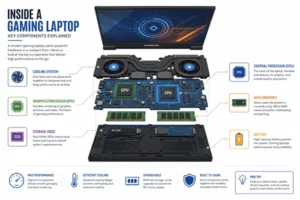
A laptop’s cooling system decides whether it can actually hold its advertised performance over time. When it overheats, it automatically slows the CPU and GPU to protect the hardware — thermal throttling — and it’ll quietly rob you of frame rates during long sessions even when the spec sheet looks great. When you’re comparing laptops, look for reviews that mention sustained benchmark results, not just short burst tests, and pay attention to fan noise and exhaust design. Better airflow generally means better sustained performance.

Battery Life and Portability

Be honest with yourself here: gaming laptops don’t have great battery life while actually gaming, because powerful GPUs drain batteries fast no matter the brand. Expect one to three hours of real gaming time unplugged, with thinner, more efficient models doing somewhat better. Battery life for everyday tasks like browsing runs much longer than for gaming itself.

Price vs. Performance — Setting a Realistic Budget

Budget gaming laptops start around $1,000–$1,500 and handle 1080p gaming well. Mid-range machines in the $1,500–$2,200 range add better displays and 1440p capability. Premium laptops above $2,200 bring top-tier GPUs and 4K-ready performance, but the returns get thin fast past a certain point.

Frequently Asked Questions

What is the best gaming laptop for beginners?

A budget RTX 5060 laptop like the MSI Katana 15 HX is a solid starting point.

Is a gaming laptop worth it over a desktop?

Only if portability matters to you. Desktops offer better value otherwise.

How much RAM do I need for gaming in 2026?

16GB is the minimum; 32GB is recommended for smoother multitasking.

Can gaming laptops last for years without upgrading?

Yes, though GPU and RAM usually aren’t upgradeable, so buy generously upfront.

What’s the difference between a “gaming” and “regular” laptop?

Gaming laptops add a dedicated GPU, faster displays, and stronger cooling.

Final Verdict — Our Top Recommendation

If you want one laptop that handles almost anything you throw at it, the HP OMEN MAX 16 is our top pick, thanks to its flexible high-wattage GPU options and consistent real-world performance. If your budget is tighter, the MSI Katana 15 HX delivers genuinely solid 1080p gaming without the premium price tag. Either way, check current prices before you buy — gaming laptop deals shift constantly, and the model you want today might be $150 cheaper next week.

Leave a Comment